The day September 30th disappeared from our app
One day we looked at the attendance records in our app and saw something strange. 30 September was missing. People had checked in, but the app showed nothing for that day.
Nothing had crashed and there were no error messages. The app looked perfectly fine. That bug, and one other like it, taught us the most important idea in this post: something can look right and still be wrong.
The app, in one paragraph
I joined the team at Pure Bhutan in August. Our internal app handles attendance, tasks and reports, and it has an AI assistant inside. It is built with Lovable (it creates apps from chat messages), Supabase (a database with login built in) and Gemini (Google's AI model). We write and check code with Claude Code, an AI coding helper.
Chapter 1: Where did the 30th go?
The cause was one very common line of code:
new Date(2026, 9, 0).toISOString().split("T")[0]; // "2026-09-29", but we wanted the 30th
Here is what happens. Bhutan is 6 hours ahead of UTC, the world's standard clock (India is 5½ hours ahead). toISOString() converts the time to UTC. Midnight on 30 September in Thimphu is still 6 PM on 29 September in UTC. So the code asked for "the last day of September" and got the 29th.
The same thing happened to the last day of every month. It was easy to miss, because nothing looked broken.
Lesson 1: use toISOString() for exact times only. For dates like "today" or "end of the month", build the date from your local time.
Chapter 2: The changes that never went live
The second bug was the same kind of problem in a different place.
When we change the database, for example to add a new column, we write a migration: a small SQL file with the change. We saved ours in Supabase's usual folder and pushed them to GitHub. Everything looked done. But some of those changes never reached the live database.
The reason: our app runs on Lovable, and Lovable reads database changes from a different folder. Files in the usual Supabase folder were simply ignored. There was no error and no warning.
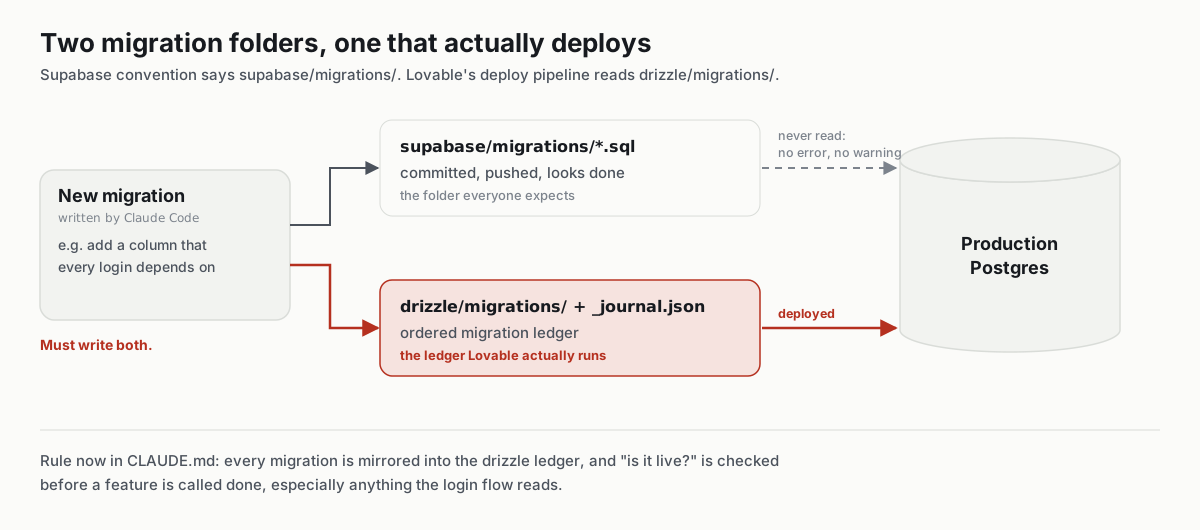
Now every change goes into both folders, and we check that a change is really live before we call it done.
Lesson 2: if you build on a no-code or low-code tool, find out exactly how it puts changes live. Don't guess.
Chapter 3: Why this matters even more with AI
Both bugs had the same shape: everything looked fine. If that can happen with a date or a folder, it can certainly happen with AI. An AI can sound confident and still be wrong. So we built our AI assistant on the same idea: don't trust how it looks, check it where it can't be faked.
The first place is data. Many teams protect data by writing in the prompt: "Never show one person's data to another." But a prompt is only a request, and a clever user can talk the AI out of it.
In our app, when the assistant reads data, it uses the login token of the person chatting. A token is like an ID card that travels with every request. Supabase then applies its database rules (RLS, Row-Level Security), which decide who can see which rows. If someone asks the AI for a coworker's private records, the database sends back nothing, however the question is worded.
Lesson 3: your prompt is not a lock. Keep safety in the database, and let the AI see only what the user can see.
Chapter 4: The AI writes, a person presses the button
The second place is actions. An AI that sends emails or creates tasks by itself can make a mess very fast. So our assistant never sends anything. It writes a draft and opens the normal form in the app, already filled in. A person reads it, fixes it if needed, and clicks Submit themselves.
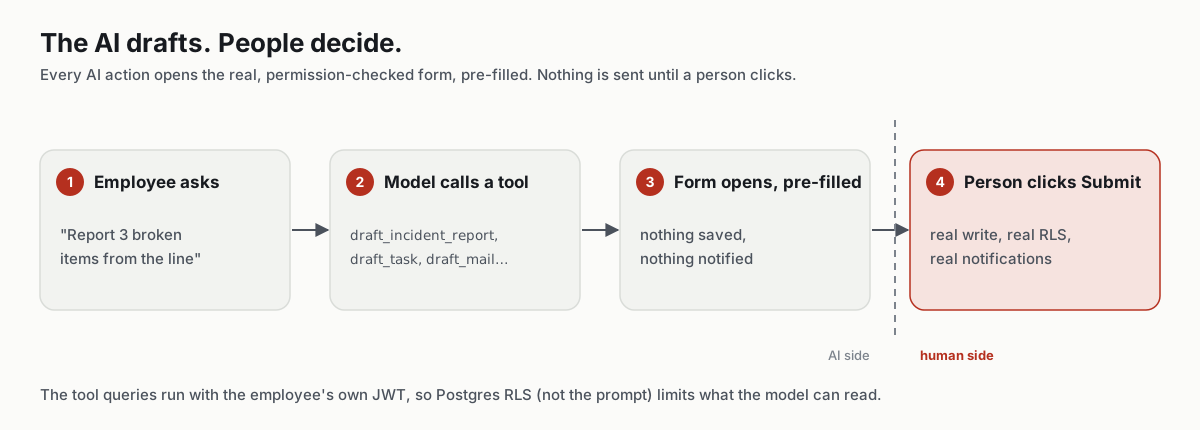
The form already checks permissions, so the AI needed no new safety rules. The same idea works for emails, tasks and incident reports.
Lesson 4: the AI prepares, a human approves. One simple rule, reused everywhere.
Chapter 5: Never learn the same lesson twice
The folder problem was hard to find. The worst thing would be to forget it and find it again. And AI coding helpers forget everything when a session ends.
So we keep two plain text files in the project:
CLAUDE.md, a rulebook. When we learn something the hard way, it becomes a line here, like "database changes must go in both folders".- A work diary. After each piece of work we add a dated note: what changed, how it was tested, and what a person still needs to do.
Claude Code reads these before it starts work. It's like handing a new teammate the project notes on their first day, every single day.
Lesson 5: write down every lesson where your AI helper will read it first. Two simple files gave ours a memory.
Back to September 30th
One missing day taught us the idea behind everything in this post: the dangerous bugs are the quiet ones. Check where things can't be faked, and write down what you learn.
If you are building with AI in Bhutan, India or anywhere else, here is the short version:
- Build dates from local time, not
toISOString() - Find out exactly how your tools put changes live
- Protect data with database rules, not with the prompt
- Let the AI draft; let a person click the final button
- Write every lesson down where your AI helper reads it first
Come to a Saturday meetup if you want to swap stories.
 Loden Foundation