The script was cinematic. The video wasn't.
The AI-written script had camera directions, lighting notes and every cinematic detail I'd hoped for. The video it produced was worse than what I had managed on my own.
I’m Avinash Biswa, a chemistry graduate working in graphic design at Pure Bhutan, mainly on labels and packaging. I taught myself some programming in middle school, and I’m now returning to that interest as a hobbyist exploring AI and technology.
This post covers two experiments I ran for Pure Bhutan: an AI-generated product promo using Higgsfield, and a product Q&A agent built on a RAG setup. I walk through the workflow, cost, and results of each—what worked, what fell short, and what I learned along the way.
I’m still learning and would welcome feedback from people with more experience. If a different tool, workflow, or approach could have improved the results or reduced wasted credits, I’d love to understand how and try it in my next experiment.
At a glance
| Promo video (Higgsfield) | Product Q&A agent | |
|---|---|---|
| Goal | A cinematic promo for one product | Answer questions about our products and company |
| Tools | Claude / ChatGPT for scripts, Higgsfield for video, CapCut for editing | ChatGPT (avatar design), ElevenLabs (voice), Anam AI (live avatar), a RAG knowledge base |
| Budget | 2,567 of 6,000 credits on the Ultra plan | Free plans only |
| Time | 2 days | 5–6 days (4–5 for the agent, 1 for the avatar) |
| Result | Promo still a work in progress; one short clip published | Working prototype; handled 11 test questions, including refusing confidential ones |
Experiment 1: AI-written script → Higgsfield video
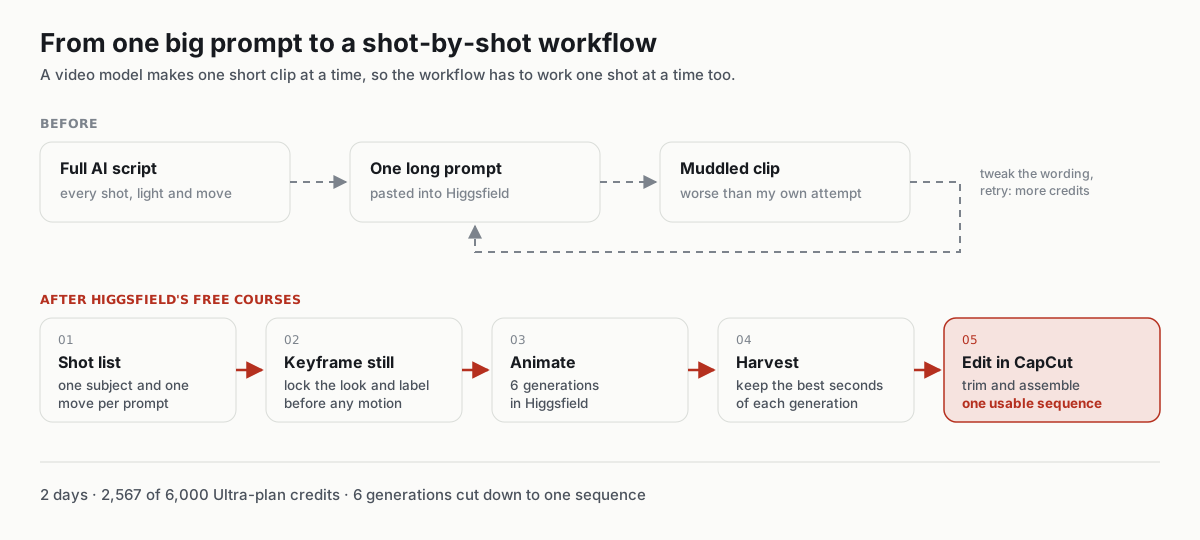
The first workflow (didn't work)
- Asked Claude or ChatGPT to write a full promo script: shots, camera moves, lighting, mood.
- Pasted the script, more or less as written, into Higgsfield as the video prompt.
- Generated, reviewed, tweaked the wording, and generated again.
The problem: a long, multi-shot script reads well to a person, but a video model generates one short clip at a time. Packing a whole storyboard into a single prompt gave me muddled results, and every retry cost credits.
A script can describe a brilliant video without producing one.
The second workflow (after Higgsfield's free courses)
After taking a few of Higgsfield's free courses, I changed the process:
- Turn the script into a shot list. Each shot gets one subject, one action and one camera move, written as its own short prompt.
- Lock the look with a still image first. I generate a keyframe of the product and only animate it once the composition, lighting and label look right. A bad still costs far less than a bad video.
- Keep camera directions simple. "Slow push-in" or "orbit left" works better than stacking several moves into one shot.
- Generate, then harvest. None of my six generations was perfect from start to finish, but each had a few seconds that were genuinely good. Rather than spending more credits chasing one flawless take, I kept the best moments from each.
- Assemble in CapCut. I trimmed those moments and cut them together into one sequence.
Lesson: When every generation costs credits, the workflow matters more than writing the perfect prompt.
Budget and outcome
- Plan / credits: Higgsfield Ultra plan with 6,000 credits; this experiment used 2,567.
- Generations: 6 videos, each with only certain parts worth keeping.
- Usable output: The best segments from all six, edited together in CapCut.
- Did it get used? The full promo was made as a learning exercise and is still a work in progress. Using the same workflow, I made a separate short clip and published it on several social media platforms:
Experiment 2: a product Q&A agent (RAG)
This one I built only to learn, in detail, how AI agents are put together. It's a prototype, and it worked better than I expected.
How it's built
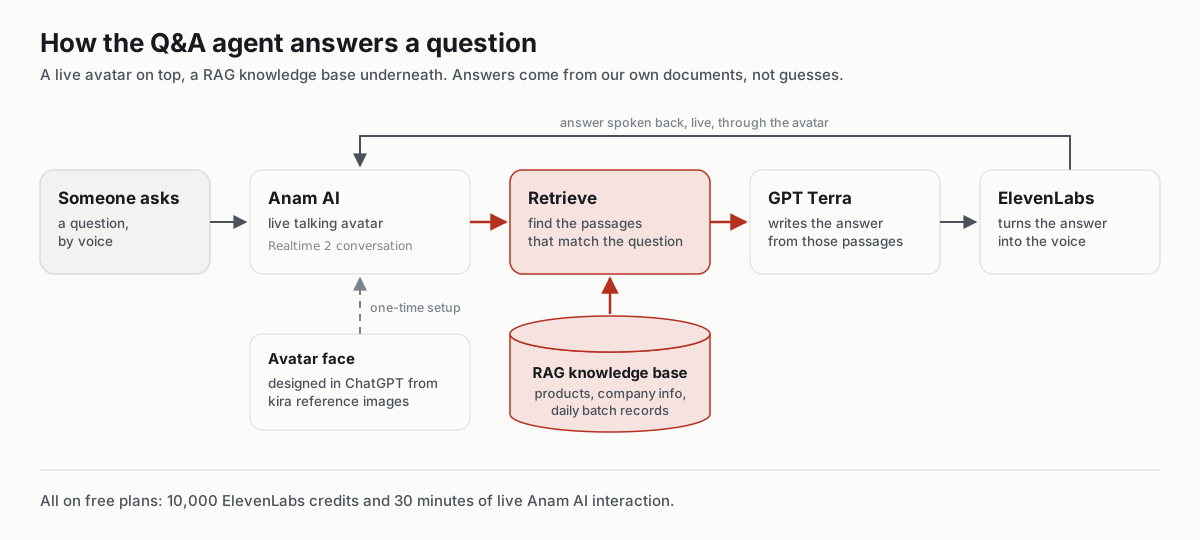
- Avatar design (ChatGPT): I gave ChatGPT several reference images of Bhutanese women in kira and had it create an original avatar, so the agent has its own face rather than any real person's.
- Voice (ElevenLabs): The agent's voice comes from ElevenLabs, using the 10,000 credits on the free plan.
- Live avatar (Anam AI): Anam AI turns the avatar into a live, talking video character. Its free plan allows 30 minutes of live interaction.
- Models: Realtime 2 handles the conversation, which made talking to it smooth and natural. GPT Terra is the LLM, which was good enough for a prototype.
Why RAG instead of the built-in knowledge base
Anam AI has a simple knowledge base for adding some context, but I wanted the agent to know our company in detail, including everyday batch records. So I used RAG (retrieval-augmented generation): our company and product information is stored as documents, the passages that match each question are retrieved, and the LLM answers from those passages rather than guessing.
Testing it
I asked 11 questions, from simple through complex to confidential:
- Simple questions: answered quickly and accurately.
- Complex questions: some took a little longer, but the explanations were good.
- Confidential questions: refused immediately, which was exactly what I wanted.
Budget and outcome
- Cost: Everything ran on free plans. That kept the cost at zero, but the limits (especially 30 minutes of live avatar time) stopped me from testing as much as I wanted.
- Where it's used: Nowhere yet. It's a prototype for learning.
What's next: role-based access
I'm taking this concept into a real project I'm working on with my colleague Ayush Kumar Pandey. The main addition will be role-based access: what the agent answers depends on who's asking.
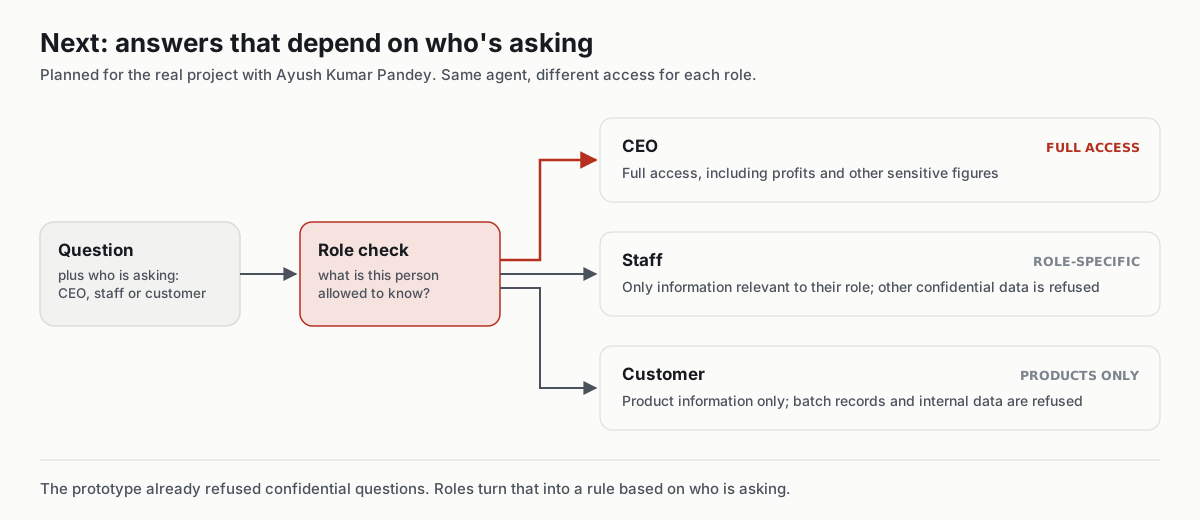
When that project is live, I'll link it here or write a follow-up post.
What I'd tell someone starting out
- Break the script into shots. Video models work best one clip at a time.
- Harvest the good parts. Instead of regenerating for a perfect take, keep the best seconds from each attempt and edit them together.
- Ground the AI in your own data. For product questions, RAG beats a general chatbot because it answers from your documents.
- Plan who can see what. Once an agent knows internal data, deciding who is allowed to ask what matters as much as the answers.
- Free plans are enough to learn. Their limits show up quickly, though, so plan your tests around them.
My curiosity is free. My experiments are not.
 Loden Foundation